
CONTENTS:
- The manual vs. automated way
- What are email automations
- 4 essential automation sequences for wellness businesses
- Building your first automation: a step-by-step action plan
- Customer segments: The secret weapon for targeted communication
- Advanced automation strategies
- Common automation mistakes
- Crafting compelling automated emails
- Measuring automation success
- Your 7-day challenge
- The future of automations
- The bottom line
Ready to begin your studio journey?
Launch your studio with a free trial of OfferingTree and start your journey off right. Build your website, offer classes, take payments, and so much more!
This article is based on insights from Eddie Arpin and Arvind Menon, OfferingTree co-founders, shared in an OfferingTree webinar on best practices for email automations for wellness businesses.
Imagine if your wellness business could nurture new subscribers, re-engage dormant clients, and follow up with recent purchasers, all while you’re teaching classes, creating content, or simply enjoying a day off.
This is the power of email automation.
In an OfferingTree webinar, co-founders Eddie Arpin and Arvind Menon walked wellness business owners through the platform’s wellness automation features, demonstrating how to build sophisticated email sequences that work around the clock. Whether you run a yoga studio, own a pilates business, or teach fitness classes, these automation strategies can transform how you connect with your community.
Here’s everything you need to know about setting up email automations that actually get results.
The manual vs. automated way
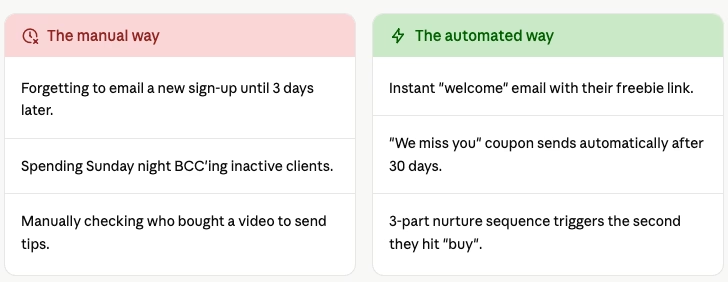
If you’re still manually emailing every person who signs up for your newsletter, you’re hitting a growth ceiling. Here is how automation shifts the scales:
What are email automations and why do they matter?
At its core, an automation is a feature that performs specific tasks based on actions your clients take. As Arvind explains, automations allow you to “perform certain tasks, such as sending emails or reminders based on things that your clients do.”
Instead of manually sending welcome emails to every new subscriber or remembering to follow up with someone who downloaded your free meditation, automations handle these touchpoints automatically. The result? Consistent, timely communication that keeps your audience engaged without adding to your to-do list.
For wellness business owners juggling teaching, administration, and marketing, automations are game-changing. They ensure no one falls through the cracks while freeing you to focus on what you do best: serving your clients.
4 essential automation sequences for wellness businesses
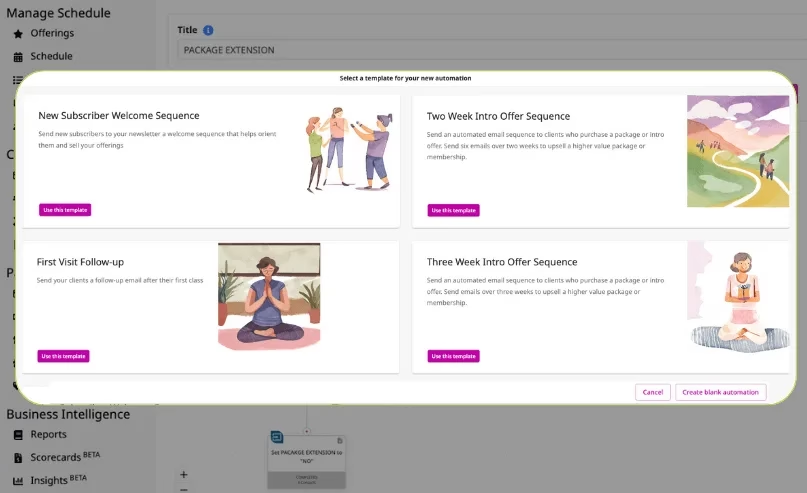
During the workshop, Eddie and Arvind demonstrated several automation workflows that wellness professionals can implement immediately. Here are the most impactful ones:
1. The freebie welcome sequence
One of the most common use cases is creating an email sequence after someone signs up for a freebie, whether that’s a free class, downloadable guide, or meditation video. This sequence typically includes:
- Day 0: 📧 The Delivery. Send the promised freebie immediately.
- Day 2: 📧 The Connection. Share your “Why” or your teaching philosophy.
- Day 5: 📧 The Invite. Ask them to book a consultation or their first class, such as booking a consultation or purchasing a class package
The key is spacing these emails appropriately (typically a few days apart) so you stay top-of-mind without overwhelming new subscribers.
2. The video purchase follow-up
When someone purchases an online video or on-demand class, an automation can deliver a thoughtful sequence that enhances their experience:
- Immediate delivery of purchase confirmation and access instructions
- A check-in email a few days later asking about their experience
- Recommendations for related content or complementary offerings
- A special offer for their next purchase
This type of automation turns a one-time purchaser into an engaged community member by extending the relationship beyond the initial transaction.
3. The re-engagement campaign
Perhaps the most powerful automation demonstrated in the workshop was the re-engagement sequence for inactive clients. Using customer segments (more on this below), you can identify clients who haven’t attended a class in a specific timeframe and automatically send them targeted messages.
Eddie walked through creating a segment of clients who haven’t attended in 30 days, then setting up an automation to remind them about your offerings, share new class times, or offer a welcome-back incentive. This proactive approach can bring dormant clients back before they completely disengage.
4. The membership expiration alert
For businesses offering memberships or class packages, automations can notify clients when their membership is about to expire. These timely reminders increase renewal rates by catching clients before they lapse, making it easy for them to continue their wellness journey with you.
Building your first automation: a step-by-step action plan
Let’s walk through creating a freebie welcome sequence, following Arvind’s demonstration from the workshop:
Step 1: Create your landing page (5 mins)
Build a simple landing page offering your freebie. Add a newsletter sign-up block where visitors can enter their name and email address. The critical piece here is creating a contact tag—for example, “Freebie Sign Up”—that gets assigned when someone submits the form.
This tag becomes the trigger for your automation, telling the system: “This person just signed up for the freebie, so start the welcome sequence.”
Step 2: Build your automation (2 mins)
Navigate to your automation section and create a new automation. Give it a clear name like “Freebie Welcome Sequence” so you can easily identify it later.
Set your trigger as “Contact tag added,” and select the tag you created (“Freebie Sign Up”). This tells the automation to start whenever that tag is applied to a contact.
Step 3: Add your email sequence (10 mins)
Now build out your email sequence by adding “Send email” actions. For each email:
- Write compelling subject lines that encourage opens
- Craft valuable content that delivers on your promise
- Include clear calls-to-action
- Add appropriate delays between emails (typically 3-5 days)
In the workshop, Arvind demonstrated adding three emails to a sequence: an immediate welcome, a follow-up three days later, and a final email five days after that. You can adjust timing based on your audience and content.
Step 4: Test and activate (3 mins)
Before activating your automation for real clients, test it thoroughly. Add yourself as a contact with the trigger tag and verify that:
- Emails send at the right intervals
- Content displays correctly on desktop and mobile
- Links work properly
- Personalization tokens (like first name) populate correctly
Once you’re confident everything works as intended, activate the automation and watch it nurture your new subscribers automatically.
💡 Pro-tip from Eddie: “When importing existing contacts from another platform, always deactivate your automations first. You don’t want to accidentally send a ‘Welcome’ email to a client who has been with you for five years!”
Customer segments: The secret weapon for targeted communication
One of the most exciting features discussed in the workshop was customer segments—a powerful tool that allows you to identify specific groups of clients based on their behavior, purchase history, or engagement level.
As Arvind explained, customer segments let you “build queries” to find clients who match certain criteria. For example, you might create segments for:
- Clients who haven’t attended a class in 30, 60, or 90 days
- People who have purchased a specific type of class or service
- Subscribers who have never made a purchase
- VIP clients who attend multiple times per week
- Members whose packages or memberships are expiring soon
Once you’ve identified a segment, you can use it in two powerful ways:
- One-Time Campaigns: Send a targeted newsletter to a specific segment. For instance, you might announce a new advanced class series only to clients who regularly attend your intermediate sessions.
- Ongoing Automations: Set up automations that continuously monitor for clients entering a segment. When someone hits the 30-day mark without attending, they automatically receive your re-engagement sequence.
Advanced automation strategies
Once you’re comfortable with basic automations, Eddie and Arvind shared some advanced strategies to maximize impact:
Tag-based branching
Use tags strategically to segment your audience and personalize their journey. For example, tag clients based on their interests (“interested in prenatal yoga,” “loves meditation,” “prefers morning classes”), then create automations tailored to those specific interests.
Behavioral triggers
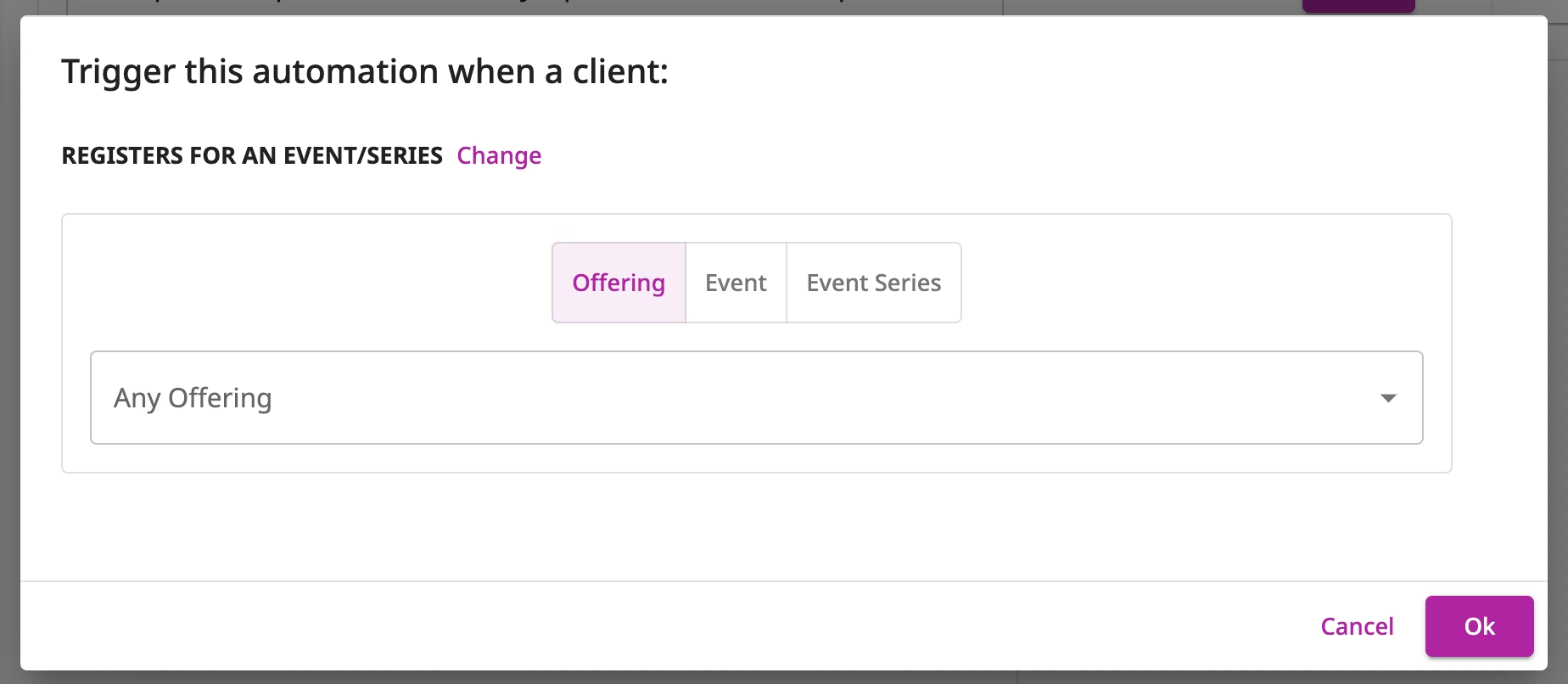
Set up automations based on client actions beyond just signing up. Trigger emails when someone books their first class, completes a certain number of sessions, or purchases a specific product.
Exclusion logic
When setting up re-engagement campaigns, use customer segments to exclude currently active clients. This ensures you’re only messaging those who truly need the nudge, preventing unnecessary emails to engaged community members.
Multi-touch nurture sequences
Create longer sequences that provide ongoing value. Instead of three emails, consider a 6-8 email series that educates new subscribers about your philosophy, introduces different class types, shares success stories, and gradually guides them toward becoming paying clients.
The Goal: Send the right message to the right person. Don’t blast your entire list about a “Beginner’s Workshop” if half of them are advanced practitioners.
Common automation mistakes to avoid
Throughout the workshop, Eddie and Arvind addressed common pitfalls that can undermine your automation efforts:
Forgetting to deactivate during imports
When importing existing contacts from another platform, temporarily deactivate your automations. Otherwise, hundreds or thousands of existing clients might receive your “new subscriber” welcome sequence, which could confuse or annoy them.
Sending too many emails too quickly
Respect your subscribers’ inboxes. Space emails appropriately and provide genuine value in each message. A good rule of thumb is waiting at least 3-5 days between automated emails in a sequence.
Neglecting mobile optimization
Most people read emails on mobile devices. Always preview your automated emails on both desktop and mobile before activating to ensure they’re readable and visually appealing on all screens.
Set it and forget it (without monitoring)
While automations run automatically, you should still monitor their performance. Check open rates, click rates, and unsubscribe rates periodically. If performance drops, refresh your content or adjust your approach.
Using generic, sales-heavy content
Your automations should provide value first and sell second. Share helpful tips, inspiring stories, or educational content before asking for the sale. Build trust and rapport through your automated sequences.
Crafting compelling automated emails
The success of your automations depends heavily on the quality of your email content. Here are key elements that make automated emails effective:
Subject lines that get opened
Your subject line determines whether someone opens your email. Make them:
- Specific and benefit-focused (“3 breathing techniques to reduce stress” vs. “Newsletter”)
- Personal and conversational
- Curiosity-inducing without being clickbait
- Short enough to display fully on mobile devices
Strong opening hooks
The first sentence of your email should grab attention and make the reader want to continue. Start with a question, a surprising fact, or acknowledge a common pain point your audience experiences.
Value-driven content
Every email should give the reader something useful—a tip they can implement, knowledge that helps them, or entertainment that brightens their day. Don’t just send promotional messages.
Clear calls-to-action
Tell readers exactly what you want them to do next. Whether it’s booking a class, watching a video, or simply replying to your email, make the desired action obvious and easy to complete.
Authentic voice
Write like you’re talking to a friend who came to you with a question. Your automated emails should sound like you, not like a corporate marketing department. This authenticity builds connection even though the email is automated.
Measuring automation success

Tracking automation performance is still evolving on most platforms, and OfferingTree is no exception. Here’s what to keep an eye on as you build out your sequences:
Delivery and open rates Open rate tracking within automations is coming soon — specifically, the ability to see automation activity directly on a client’s profile timeline, including when they entered a sequence and whether they opened individual emails. In the meantime, monitor open rates on your standard email campaigns to get a read on what subject lines and send times resonate with your audience.
Click-through rates Link click tracking is currently available for standard email campaigns. Use this data to gauge which content and calls-to-action are landing — then apply those lessons when writing your automated sequences.
Conversion rates Track how many people complete your desired action — booking a class, purchasing a package, or attending their first session. This is the ultimate measure of whether your automation is doing its job.
Unsubscribe rates A spike in unsubscribes is a signal worth investigating. Review recent emails for signs of over-messaging, overly promotional content, or a mismatch between what subscribers expected and what they received.
Don’t try to automate your entire business today.
Your mission:
- Start simple: Choose one automation to build first—likely a welcome sequence for new subscribers or freebie downloads. Let it run for a week, watch the opens roll in, and then add your second email.
- Map your journey: Before building, outline the subscriber journey. What emails will they receive, when, and why?
- Write valuable content: Draft your emails focusing on providing value and building relationships rather than just selling.
- Test thoroughly: Send yourself through the automation to catch any issues before it goes live.
- Activate and monitor: Turn on your automation and watch the results, making adjustments as needed.
- Expand gradually: Once your first automation is running smoothly, add more sequences for different scenarios.
If you’re an OfferingTree user, explore the platform’s automation features to start building your first sequence today. The team has created helpful documentation and video tutorials to guide you through the process.
Not yet using OfferingTree? Learn how the all-in-one platform can streamline your entire wellness business, from scheduling to payments to marketing automation.
The future of automations
OfferingTree is actively expanding its automation capabilities. One of the most useful features on the horizon is a client profile timeline that will show exactly when a contact entered an automation, which emails they received within that sequence, and whether they opened them–making it much easier to troubleshoot and personalize follow-up.
Additional improvements in development include email templates to speed up sequence creation and the ability to watch free videos without requiring account creation, which will make freebie automations even more seamless for new subscribers.
The bottom line
Email automation isn’t about replacing genuine human connection, it’s about scaling it. As Eddie and Arvind demonstrated in their workshop, thoughtful automations allow you to provide consistent, valuable touchpoints with every person in your community, ensuring no one gets overlooked while freeing you to focus on high-impact activities.
Whether you’re welcoming new subscribers, re-engaging dormant clients, or nurturing recent purchasers, automations handle the routine communication that keeps your community connected and engaged. The result? More bookings, stronger relationships, and a wellness business that runs more smoothly—all while you’re teaching classes, creating content, or simply enjoying life outside of work.
Start with one simple automation this week. Choose your highest-priority use case, map out the emails, and build the sequence. Your future self and your growing community will thank you.