

Ready to begin your studio journey?
Launch your studio with a free trial of OfferingTree and start your journey off right. Build your website, offer classes, take payments, and so much more!
Punchpass earned its reputation as a clean, simple class pass tool, and for some studios, that is still the right fit. But once you start adding memberships, on-demand video, a real website, hybrid offerings, or a branded app for your clients, you start running into the edges. That is usually when studio owners begin looking at what else is out there.
This guide walks through eight Punchpass alternatives that fitness, yoga, pilates, and wellness studios are evaluating in 2026. Each one solves a slightly different version of the same problem, and the right answer depends on what your studio looks like a year from now, not just today.
What counts as a “Punchpass alternative”?
A Punchpass alternative is any platform that handles the things a fitness or wellness studio needs to run: class scheduling, passes and memberships, payments, client communication, and reporting. The stronger alternatives bundle in features that Punchpass does not natively offer in depth, like a branded client app, an integrated website, on-demand video, marketing tools, and hybrid in-person plus online support.
We picked these eight based on category fit, user reviews, and what each platform actually does well. They serve a range of studios, from solo teachers to multi-location operations.
1. OfferingTree
Best for: Independent wellness professionals and small-to-mid-size studios who want everything in one place without surprise charges.
Starting price: Individual plans from $26/month (Essentials, billed annually). Studio plans starting at $100/month.
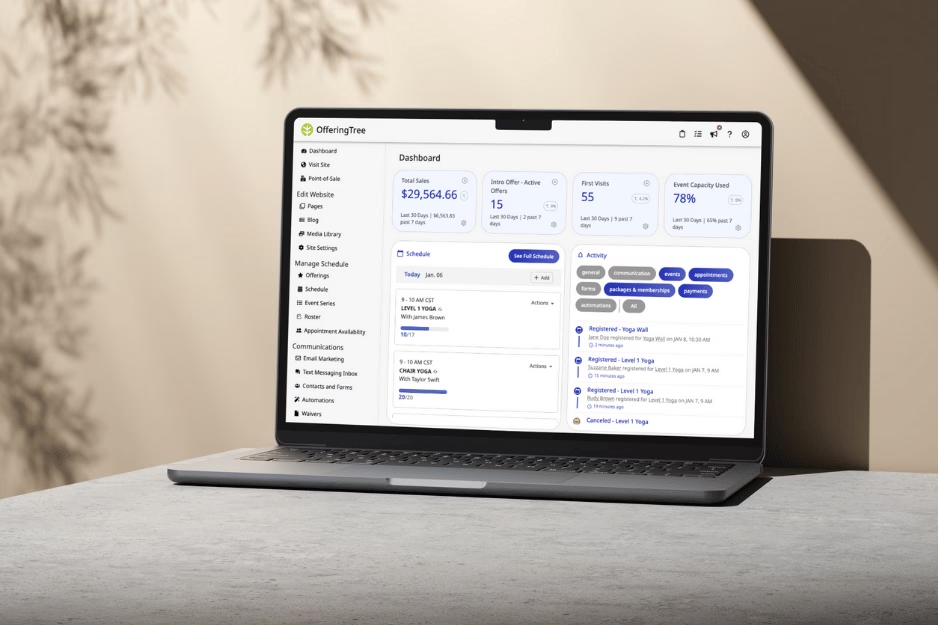
OfferingTree is an all-in-one wellness business platform built for studio owners who did not get into this work to manage software. It rolls scheduling, memberships, payments, a branded client app, an integrated website, marketing tools, and unlimited on-demand video into one system with one login and one bill.
Where OfferingTree stands out against Punchpass is breadth without complexity. You can run class passes the way you do today, then add a workshop series, a membership tier, a recorded class library, and an email campaign without bolting on three more tools.
A few things studios tend to notice first:
- Transparent published pricing for both individuals and studios, with no annual lock-in.
- 0% transaction fees on all Pro, Pro Plus, and Studio plans (you only pay standard Stripe processing).
- Free onboarding with data migration assistance on Studio plans, and a real human onboarding team rather than a help-center link.
Learn more about OfferingTree’s scheduling software for fitness studios, the full studio software overview, or how it works for yoga studios and pilates studios.
2. Glofox
Best for: Boutique fitness studios scaling past a single location and willing to invest in a heavier, more configurable system.
Starting price: Quote-based.
Glofox (now part of ABC Fitness) is built for boutique fitness studios that want a polished branded app and heavier automation. It leans toward studios growing into multiple locations or running large class volumes with paid memberships as the core revenue model.
Strengths include the branded member app, retention workflows, and reporting depth. The trade-off is complexity: Glofox has more surface area than a solo teacher or small studio actually needs, and the learning curve reflects that. Pricing is quoted based on studio size and feature set.
3. Vagaro
Best for: Studios that combine classes with appointment-based services and want marketplace visibility as a client acquisition channel.
Starting price: $23.99/month for one bookable calendar, with each additional staff calendar adding $10/month.
Vagaro started in the salon and spa world and has since expanded into fitness. The standout feature is the Vagaro marketplace, which puts your studio in front of clients searching for classes and appointments in your area.
If your business mixes classes with appointment-based services like massage, personal training, or beauty treatments, Vagaro handles that hybrid better than most class-first platforms. Pricing scales with users and add-ons, so confirm a current quote with Vagaro before comparing.
4. Acuity Scheduling
Best for: Solo teachers, private instructors, and small studios that prioritize a fast, simple scheduler over a full studio management system.
Starting price: $16/month
Acuity is the right answer for solo instructors and small teams who mostly need a clean, fast scheduler with reliable calendar sync and low admin overhead. It handles one-on-one sessions, small group classes, and hybrid in-person plus online setups well.
Where Acuity falls short is on the full studio management side. Class passes, complex memberships, retail, and deep reporting are not its strengths. If you are running a yoga studio with a punch card system, a recurring membership tier, and a small retail shelf, you will outgrow Acuity quickly. If you are a private instructor or a small wellness practitioner, it might be exactly enough.
5. Omnify
Best for: Studios that run a mix of drop-in classes and structured course or program offerings.
Starting price: $49/month
Omnify is a feature-rich scheduling platform that supports group classes, courses, camps, and reservations. It is a strong fit for studios that run multi-week programs alongside drop-in classes, like a kids yoga camp, a teacher training, or a beginner pilates series.
Course-style booking, automated reminders, and online payments are the core strengths. Like several others on this list, Omnify is best evaluated on a free trial with your actual class schedule.

6. TeamUp
Best for: Class-based businesses (group fitness, CrossFit, yoga, pilates) that want pricing tied to active customers rather than flat fees.
Starting price: $119/month, scaling by active customer count.
TeamUp scales pricing based on the number of active customers you have in a given month, which makes costs predictable and tied to your business growth.
The platform is purpose-built for class-based businesses and handles in-person, online, and on-demand under one roof. It is well-known among CrossFit boxes, group fitness studios, and yoga studios that want a no-nonsense system focused on class management rather than marketplace exposure or retail. Reporting is solid, integrations are practical, and the support team has a strong reputation. Branded apps are an additional add-on.
7. Zen Planner
Best for: Midsize and larger martial arts gyms, CrossFit boxes, and fitness operations that need deep automation and reporting.
Starting price: $99/month, scaling by active member count.
Zen Planner is one of the more mature platforms in this category, with deep roots in martial arts, CrossFit, and gym operations. It is an all-in-one with strong billing, reporting, automations, and apps for both staff and members. It tends to fit midsize and larger studios that have outgrown lighter tools.
The trade-off is cost and complexity. Zen Planner uses its own in-house payment processor by default, and websites and advanced marketing automation are paid add-ons that can push the all-in monthly cost meaningfully higher.
A quick definition: automations are workflows that run without you, like sending a reminder email 24 hours before a class or charging a recurring membership.
8. Exercise.com
Best for: Gyms, online fitness businesses, and trainers building a programming-plus-business platform with a branded app at the center.
Starting price: Custom and quote-based.
Exercise.com is the heaviest platform on this list. It is built for fitness businesses that need not just class booking and memberships, but workout delivery, custom training plans, e-commerce, and a branded app, all under one custom-built setup.
If you are a personal trainer scaling into an online coaching business, or a gym that wants to deliver programming through an app the way larger fitness brands do, Exercise.com is in the conversation. It is not a fit for a small yoga studio or solo teacher.
How to pick the right Punchpass alternative for your studio
The honest answer is that the best platform depends on what your studio looks like in twelve months, not what it looks like today. A tool that fits your current punch card setup might be the wrong tool the moment you launch a membership tier or add an online library.
A simple way to work through it:
- List what you actually do. Every class type, every pricing structure, every channel (in-person, online, on-demand), and every system you currently use. Most studio owners are surprised by how long the list is.
- List what you want to do in a year. Branded app? On-demand library? Workshops? A second location? This is the real evaluation criteria, not your current state.
- Shortlist three platforms. More than that, and you will not get through trials.
- Run a real trial, not a demo. Set up a few actual classes, add real clients in test mode, and run through a week of bookings, payments, and reminders. You will learn more in two hours of real use than in a one-hour sales call.
- Model the all-in cost. Base subscription plus payment processing plus add-ons plus per-staff fees. The sticker price is rarely the real price.
For a longer walkthrough, our pilates studio software buyer’s guide covers the same evaluation framework in depth, and most of it applies to fitness and yoga studios as well.

Features worth comparing across platforms
A few things tend to make or break the decision when you sit down to evaluate. Integrated scheduling is the baseline: classes, appointments, workshops, and courses in one calendar. Class pass and membership handling matters more than people realize, especially the small things like auto-renewal, freezes, and family or shared plans.
Payment processing is where the surprises live. Pay attention to whether the platform charges its own transaction fee on top of Stripe, because over a year of class sales that single line item is often the biggest difference between two platforms that look similar on paper. Waitlists, a feature that puts clients in a queue when a class is full and automatically promotes them when a spot opens, are essential for any studio with popular classes.
The remaining must-haves are reporting that tells you which classes, teachers, and time slots are profitable; basic marketing tools like email and a light CRM, so you are not paying for a separate Mailchimp account; a branded client app if your clients expect to book and check in from their phones; on-demand and live online class support, since hybrid is no longer a bonus feature (see our guide to video conferencing options for online classes); and customer support, the kind where a real person answers when something breaks at 5:55pm before your 6pm class.
What to expect on pricing and fees
Pricing in this category ranges widely, and headline numbers are usually the start of the conversation, not the end. The base subscription is the obvious starting point, but plenty of vendors do not publish it at all. Per-staff and per-location fees are the next thing to check, and they tend to add up faster than studio owners expect.
Payment processing is the line item most worth scrutinizing. Some platforms charge their own transaction fee on top of Stripe, while others (including most of OfferingTree’s plans) do not. Over a year of class sales, that difference is meaningful. OfferingTree’s entry-level Essentials plan does include a small transaction fee, which is why it can be priced so low.
Add-ons are the other place costs creep in: branded app, on-demand video, advanced marketing, extra users. If a feature is critical to your studio, confirm it is in the plan you are quoted, not the next tier up. Finally, look at contract terms. Month-to-month billing, a clear cancellation policy, and migration assistance included in onboarding (rather than as a paid extra) are all signals that the vendor expects to earn your business each month rather than lock you in.
The simplest way to compare apples to apples is to model your real all-in monthly cost at one year of growth, not your launch month.
How to switch from Punchpass without losing your weekend
A few things make the transition far easier than studio owners expect:
- Export your data first. Class history, client list, pass balances, membership status. Most platforms will import it cleanly if you can hand them a clean export.
- Pick a quiet week to switch. Not the first week of January. Not the week before a workshop. A normal teaching week with predictable bookings.
- Tell your clients early. A short email that says “we are upgrading our booking system on [date] and here is what you need to do” prevents the most common transition headache, which is clients being confused about how to log in.
- Train your front desk and subs. Get other instructors and staff into the new platform a week before go-live.
- Run parallel for a few days if you can. Old system still readable, new system taking new bookings. It is not always possible, but when it is, it makes the cutover almost boring.
Good vendors will help with all of this. If a platform’s response to “can you help me migrate?” is a help-center link, that tells you something. If it is a real human with a calendar invite, that tells you something else.
Frequently asked questions
What features should a fitness studio prioritize in booking software? The essentials are easy class scheduling, flexible pass and membership management, integrated payments, reliable reporting, waitlists, and accessible customer support. If you run hybrid classes, add online and on-demand support to that list.
How can I evaluate the true monthly cost of fitness studio software? Look at the base subscription, per-staff and per-location fees, payment processing markups, required add-ons, and contract terms. Model your all-in monthly cost at one year of expected growth, not just at launch.
What are common challenges when switching studio management platforms? The usual ones are data migration (especially active passes and memberships), client communication, staff retraining, and adjusting to new workflows. Most are avoidable with a clean data export, a clear client email, and a quiet week to make the switch.
Are there options that support both in-person and online classes? Yes. Most modern platforms, including OfferingTree, support hybrid setups so you can run in-person, live online, and on-demand classes from the same system.
How important is customer support when choosing studio software? It matters more than feature lists suggest. The day something breaks before a class is the day you find out whether a platform’s support is real or scripted. Ask current customers, not just the sales team.
If you want to see how OfferingTree handles all of the above in one place, book a demo or start a free trial.
All comparison information taken from each respective company’s website as of April 2026.