

Ready to begin your studio journey?
Launch your studio with a free trial of OfferingTree and start your journey off right. Build your website, offer classes, take payments, and so much more!
Acuity removed its free plan a while back, and that one change has done more to drive search volume for “Acuity alternatives” than any feature comparison ever could.
If you started on the free tier years ago and your business has grown into something that costs you $20 or $40 a month now, the renewal email tends to land differently than it used to.
The good news is the rest of the studio scheduling category has caught up. There are now usable free plans, open-source tools, and a handful of all-in-one wellness platforms where scheduling is bundled in rather than billed separately.
This guide walks through ten Acuity alternatives that wellness business owners and small teams are evaluating in 2026. Some are direct one-for-one swaps. Some are bigger platforms where scheduling is one piece of a larger system.
1. OfferingTree
The all-in-one wellness platform pick. Individual plans from $26/month, studio plans from $100/month.
If you are switching from Acuity because the price went up and the feature you actually use is not the one that justifies the new tier, OfferingTree tends to be the most obvious move.
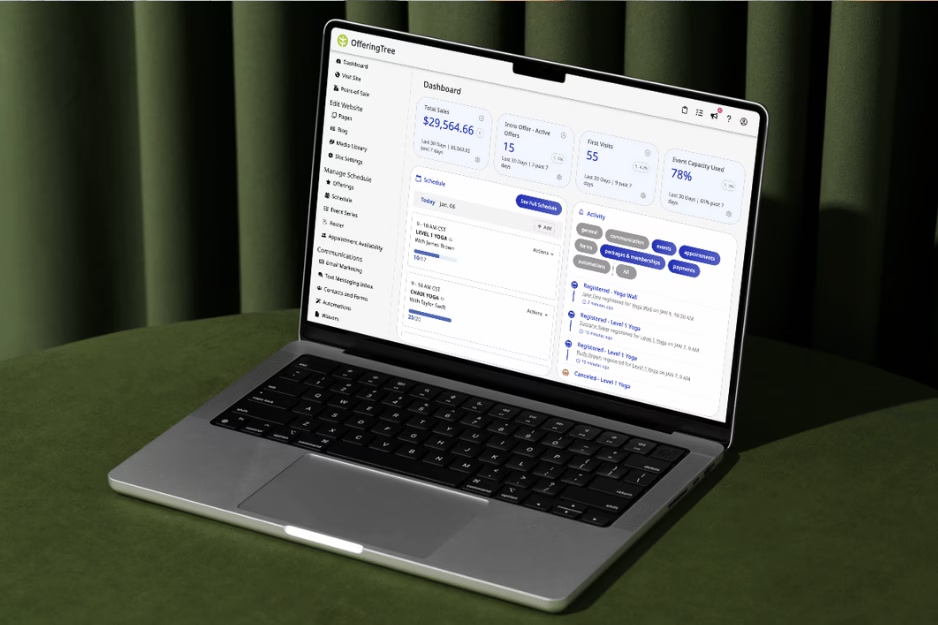
Scheduling sits inside a full wellness business platform, so the booking page connects to your client list, your payment processor, your email and SMS marketing, your unlimited on-demand video library, and a free client app.
You stop paying for Acuity plus Mailchimp plus a separate course platform plus the booking widget on your Squarespace site, and you get one bill instead.
Pro, Pro Plus, and Studio plans carry 0% transaction fees, so the only payment cost on top of your subscription is standard Stripe processing. Over a year, transaction fees can be a bigger differentiator than any base subscription gap.
The scheduling tool handles classes, appointments, workshops, and courses in one calendar, which matters if your business is more than back-to-back one-on-ones.
2. Calendly
Recognized for solo and small-team scheduling. Free plan available; paid plans from $10/seat/month.
Calendly is the platform most of your clients have already used to book a meeting somewhere else. That familiarity is worth something on its own, since the booking flow does not need explaining.
The free plan is genuinely usable for solo work allowing for one event type, one calendar connection, unlimited bookings. Standard at $10/seat/month opens up unlimited event types, multi-calendar sync, and Stripe and PayPal connections. Teams at $16/seat/month adds round-robin routing.
What Calendly does not do is the rest of running a wellness business. If you want classes, memberships, and a course library inside the same system, you are looking at the wrong tool. If a fast scheduler that integrates with everything is the only thing on your list, it is hard to beat.
3. Cal.com
Open-source, self-hostable scheduling for developers and privacy-first teams. Free for individuals; Teams from $12/user/month.
Cal.com is the answer if “I just want a scheduler” runs into “I do not want my client data sitting in another SaaS company’s database.”
The platform is open-source, which means you can self-host it on your own infrastructure or use the hosted version with the transparency that comes from public source code.
The free individual tier is generous (unlimited bookings, calendar integrations included). Paid plans unlock teams, routing forms, and APIs.
If your business has unusual integration needs or strong data-privacy requirements, Cal.com belongs on your shortlist. For most wellness teachers, it is overkill.
4. Setmore
Budget-friendly scheduler with a free plan that supports up to four users. Pro from $5/user/month when annual billing.
Setmore’s pitch is simple: a free plan that actually works for small teams, not just solo users.
Up to four users can book unlimited appointments at no cost, with Zoom and Google Meet integration, recurring appointments, and email reminders. The Pro plan at $5/user/month adds online payments through Stripe and Square, removable Setmore branding, and 24/7 human support.
The fit is small teams where everyone needs their own booking calendar but no one needs the heavier features of a full business platform. What it does not do is on-demand content, memberships, or class scheduling with waitlists and packs.
5. SimplyBook.me
Highly customizable for multi-service businesses with service catalogs and memberships. Free for 50 bookings/month; paid plans from $11.90/month.
SimplyBook.me does the most on this list at the scheduling layer specifically. The platform is built around a service catalog, so businesses with a longer list of offerings get a more natural fit than they would on a one-event-at-a-time scheduler.
Pricing rewards you picking carefully. The Free tier caps at 50 bookings per month with one provider.
Basic ($11.90/month) gets you to 100 bookings and five providers. Standard ($24.90) adds payments and POS plus optional HIPAA/SAML SSO. Premium ($49.90) lifts most caps and includes a branded client app.
For a multi-service wellness business with three or four practitioners, this can cover a lot of ground in one tool. For a solo coach with one or two services, it is more platform than the work needs.

6. Square Appointments
Free scheduling that integrates natively with the Square ecosystem. Square Plus ($49/mo) and Premium ($149/mo) for advanced features.
If you already take payments through Square, scheduling through Square Appointments is the path of least resistance. Bookings flow directly into the Square calendar, payments process through the same account as your retail sales, and inventory syncs in real time.
The entry tier is free, which is unusual for a tool with this much depth. Deeper features (advanced reporting, multi-location management, marketing) sit inside Square Plus and Square Premium at $49 and $149 per month per location.
A note on the family tree: Square owns Squarespace, which owns Acuity. Square Appointments and Acuity are technically sibling products, so if Square is already your payment processor, this is the shorter migration.
7. YouCanBookMe
Highly customizable booking pages with strong calendar intelligence. Free plan available, the Individual plan starts at $7.20/month
YouCanBookMe leans hard on customization. Booking pages can be styled with custom colors, logos, footers, and custom email templates, so the booking flow does not look like every other scheduler.
For a freelance coach whose first client touchpoint is the booking page, that visual consistency matters more than it sounds. Time-zone intelligence is built in, which means a client in London booking with a coach in California does not end up on a 4am call by accident.
The free plan covers one booking page, payments through Stripe, and customizable confirmations. Paid tiers unlock more booking pages, more calendar connections, and team features.
8. Chili Piper
Enterprise lead-routing for sales teams. Plans start at $1,250/month.
Chili Piper shows up in most “Acuity alternatives” lists, but it is honestly a different category of product.
Where Acuity is built around a service provider taking individual bookings, Chili Piper auto-routes inbound leads from a marketing form to whichever sales rep should own the meeting, with conditional logic and CRM integration handling the rest.
Pricing reflects who it is for. Routing & Scheduling starts at $1,250/month with 15 seats included. The standalone ChiliCal product at $12/user/month requires a 200-seat minimum.
Almost certainly not what a yoga teacher comparing schedulers is looking for, but worth knowing it exists if your business is on the sales-ops end of the spectrum.
9. TidyCal
Lightweight scheduler with one-time lifetime pricing. Free plan available; Individual lifetime $29; Agency lifetime $79.
TidyCal’s appeal is the pricing model nobody else really matches. Pay $29 once, use it forever.
For a freelance coach who hates recurring subscriptions, the math gets attractive fast. A single $29 payment beats $10/month over the first three months, and the savings only grow from there.
The Free plan covers unlimited bookings and unlimited booking types. The $29 Individual lifetime tier adds Zoom/Meet/Teams auto-creation, custom emails, and group bookings. Agency at $79 once unlocks round-robin and team booking.
It is not the most feature-rich option here, and it does not handle classes or memberships. For a solo wellness coach who wants the simplest possible scheduler at the lowest possible long-term cost, it is a real contender.
10. OnceHub and Bookafy
Two routing-focused schedulers for multi-staff teams. OnceHub starts free or at $10/seat/month; Bookafy free for 1 user, paid from $7/user/month.
These two share a final slot because they solve a similar problem in slightly different ways. Both are aimed at multi-staff operations where the scheduling logic gets more complex than “find a time when one person is free.”
OnceHub leans further toward enterprise sales and revenue ops, with chatbots, routing forms, and conversational handoff at the higher tiers. Bookafy stays closer to small-team scheduling, with HIPAA compliance available on the Pro+ tier.
For a clinic or wellness practice with several practitioners and compliance considerations, either can be a good fit. For a solo coach or single-instructor studio, both are more platform than the work needs.

How to choose
The strongest filter for this category is not which platform has the most features. It is which platform fits how your business is actually structured.
A simple way to work through it:
- Name your real workflow. One-on-ones only? Mixed classes and appointments? Memberships? Hybrid in-person and online?
- Decide what scheduling needs to talk to. Payments, calendar, email, on-demand video, a client app. If three or more of those matter, an all-in-one will likely beat four separate subscriptions.
- Shortlist a few platforms and run real trials. Set up two of your actual services, take a test booking, run a payment through, send the reminder. Two hours of real use shows you a lot more than a demo can.
- Model the all-in cost. Subscription plus payment processing plus add-ons plus per-staff fees. Free tiers usually cap at one user or one booking page; paid tiers usually price by seat. The sticker price is rarely the real price.
Two things tend to surprise people on cost. Payment processing fees stacked on top of standard card rates can add up to more per year than any base subscription gap. And critical features sometimes live one tier above the headline price, so confirm what you need is in the plan you would actually buy.
For wellness businesses specifically, our studio management software overview and Squarespace alternative breakdown are good next reads.
Frequently asked questions
Which scheduling alternatives offer free plans or low-cost entry?
Calendly, Cal.com, Setmore, SimplyBook.me, Square Appointments, YouCanBookMe, TidyCal, and Bookafy all have genuine free tiers as of the writing of this article. The caps vary (number of users, bookings, or event types), so the right one depends on the workflow.
How can scheduling software help reduce no-shows and streamline payments?
Automated email and SMS reminders cut no-shows substantially compared to manual booking. Pre-payment at booking, where the platform supports it, cuts them further.
What makes a scheduling tool a good fit for a freelancer or small business?
A usable free plan or low-cost entry tier, a clean booking page, calendar sync with whatever you already use, and payment processing that does not charge a transaction fee on top of Stripe.
How important are integrations and calendar syncing in scheduling platforms?
Critical. A scheduler that does not sync cleanly with your real calendar will create double-bookings within a month. Two-way calendar sync is the first thing to test on any trial.
What features should I prioritize when selecting scheduling software?
Start with the basics every scheduler needs to get right: payments that connect to Stripe or your existing processor, two-way calendar sync so you do not double-book yourself, and automated email or SMS reminders to cut no-shows.
Beyond that, match the tool to the work you actually do. Hybrid classes need on-demand video. One-on-ones need clean appointment scheduling and time-zone handling. Multi-service businesses need a service catalog. Group classes need waitlists and packs.
If three or more of those matter, an all-in-one wellness platform usually beats stacking a separate scheduler on top of three other subscriptions.
If you are leaving Acuity and your business is more than just back-to-back one-on-ones, an all-in-one wellness platform usually saves money and removes complexity at the same time.
To see what that looks like without booking a sales call, start a free trial of OfferingTree or take a look at our scheduling and booking feature page. No contract, transparent pricing, and a team that picks up the phone.
This information was gathered from the websites of the named companies at the time of writing the article. Please always check to ensure that sales, new features, and acquisitions haven’t changed this information substantially!